LinkedIn Recruiter functions as a full ATS. Recruiters search it with Boolean queries, filter by skills tags, and receive AI-ranked candidate lists, exactly as they use Greenhouse or Workday. Your LinkedIn profile is a searchable, scorable, filterable candidate record. Profiles with all-star completeness status appear in 40% more recruiter searches than incomplete profiles, according to LinkedIn's own platform data.
Most job seekers treat their LinkedIn profile as a digital business card and their resume as the document that gets them hired. In reality, LinkedIn Recruiter functions as an ATS. Recruiters search it with Boolean queries, filter by skills tags, and receive AI-ranked candidate lists, exactly the way they use Greenhouse or Workday. Your LinkedIn profile is not a supplement to your job search. It is a searchable, scorable, filterable candidate record that recruiters query before they ever see your resume. Optimizing it follows different rules than optimizing a resume, because the platform controls the structure, indexes specific fields, and uses its own matching algorithms.
Forget connection requests and follower counts. What matters here is the mechanical process: a recruiter at a company you want to work for types a search query into LinkedIn Recruiter, gets a ranked list of candidates, and either finds you on that list or does not.
How LinkedIn Recruiter Search Actually Works
LinkedIn Recruiter is a paid product that costs companies $8,000-$12,000 per seat per year. Companies pay that because it gives them searchable access to LinkedIn’s entire professional database, with filters and AI ranking that standard LinkedIn does not expose.
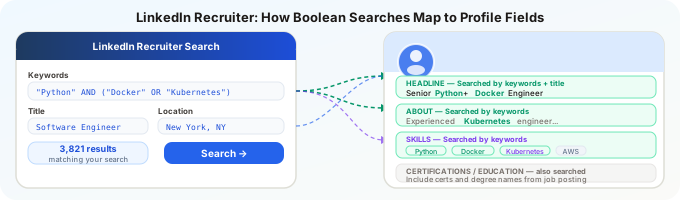
A recruiter searching for candidates works with four layers simultaneously:
Keyword search: Free-text queries like “product manager fintech B2B SaaS.” LinkedIn matches these against your headline, about section, experience descriptions, skills, and endorsement text.
Boolean operators: AND, OR, NOT, and parenthetical grouping. A real search might look like: ("data engineer" OR "data platform engineer") AND (Spark OR Databricks) AND Python NOT "looking for work". Every word in that query is checked against your profile text.
Structured filters: Location, current company, years of experience, industry, education, skills tags, seniority level. These operate on structured data LinkedIn extracts from your profile fields — not on free text.
AI-powered recommendations: Both Recruiter Lite and the full Recruiter product surface “Recommended Matches” based on job descriptions. This AI layer weighs your career trajectory, skills overlap, company similarity, and engagement signals alongside keyword matching.
Your profile, then, needs to work on two levels at once: the right free-text keywords for Boolean searches, and the right structured data (skills tags, job titles, location) for filter-based discovery.
Profiles with all-star completeness status appear in 40% more recruiter searches than incomplete profiles, according to LinkedIn’s own platform data. Completeness functions as a ranking tiebreaker. A complete profile with mediocre keywords will outrank an incomplete profile with perfect keywords, which means fixing missing sections is the highest-return change most candidates can make.
The Headline: Your Single Most Valuable Field
LinkedIn gives you 220 characters for your headline. By default, it populates with your current job title and company. Most people leave the default.
This is a significant missed opportunity, because the headline is the highest-weight text field in LinkedIn Recruiter search results. It appears in every search result listing, every InMail preview, and every candidate card. Recruiters scan headlines before they click into profiles.
What works:
Your headline should contain your target job title, two to three specific skills or domains, and optionally your current company if it adds credibility.
Examples:
Senior Backend Engineer | Python, Go, AWS | Distributed Systems at ScaleProduct Manager | B2B SaaS | Growth, Analytics, AI Product StrategyFP&A Manager | Financial Modeling, Forecasting, SAP | Manufacturing & CPG
What does not work:
- Your job title alone:
Product Manager at Acme Corp(misses keyword opportunity) - Aspirational titles you do not hold:
Aspiring Data Scientist(recruiters filter these out) - Motivational statements:
Passionate about building great products(zero keyword value) - Job-seeking signals:
Open to new opportunities(use the Open to Work feature instead, which is visible to recruiters without cluttering your headline)
The keyword density question: Pack relevant terms in, but keep it readable. The headline is displayed to every recruiter who sees your profile in search results. A keyword-stuffed headline like PM Product Manager Product Management SaaS B2B GTM reads as desperate. Aim for natural language that happens to contain high-value search terms.
The About Section: Your Searchable Summary
The About section (formerly Summary) is a 2,600-character free-text field that LinkedIn indexes for keyword search. Recruiters rarely read it in full during initial screening, but LinkedIn’s search algorithm reads every word.
Write it the way you would write a resume summary, but longer. Include:
Paragraph 1: Your professional identity, years of experience, and primary domain. Front-load the terms recruiters search for. “Data engineer with 7 years of experience building real-time data pipelines in AWS, specializing in Spark, Kafka, and dbt for high-volume transactional data” gives LinkedIn’s search engine five distinct keyword matches in one sentence.
Paragraph 2: Your specific expertise and what distinguishes you. This is where Tier 2 and Tier 3 keywords from your field belong. Be specific about industries, tools, and methodologies. “Built and maintained a streaming analytics platform processing 2M events per second for a Series C fintech startup” contains industry context (fintech), scale (2M events/second), and architecture terms (streaming analytics) that all contribute to search relevance.
Paragraph 3: What you are looking for or what you care about professionally. This paragraph is for human readers, not algorithms, but it helps recruiters understand whether to reach out.
Do not leave the About section empty. An empty About section means LinkedIn has fewer text signals to match against recruiter queries, and a profile with a filled About section will consistently outrank an otherwise identical profile without one. Even a rough draft beats nothing.
Skills: Fill All 50 Slots
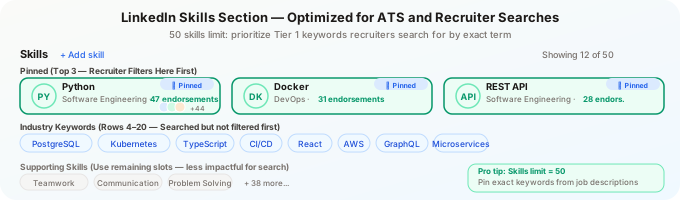
LinkedIn allows you to add up to 50 skills to your profile. Unlike the curated skills section of a resume, the median LinkedIn professional has only 12-15 listed. Profiles with 40+ skills receive significantly more search appearances, because each skill tag is an independent matching surface for recruiter searches and LinkedIn’s recommendation algorithm.
This is not about padding. Every skill you add should be something you can discuss in a conversation. But most professionals dramatically undercount their skills because they think only of their primary technical tools and forget methodologies, soft-skill categories that LinkedIn recognizes as structured tags, industry knowledge areas, and adjacent tools they use regularly.
How to fill 50 legitimately:
- List every tool and platform you use at work (even ones you consider basic)
- Add methodologies and frameworks (Agile, Scrum, Design Thinking, Six Sigma, OKRs)
- Include industry-specific knowledge areas (Financial Modeling, Clinical Trials, SaaS Metrics)
- Add the soft-skill tags that LinkedIn recognizes and that recruiters actually filter on (Strategic Planning, Cross-functional Leadership, Stakeholder Management)
- Include any certifications as skills (Google Analytics Certified, AWS Certified, PMP)
Pin your top 3 skills. LinkedIn lets you reorder skills and pin three to the top of your profile. These should be the three terms most relevant to the roles you are targeting. They appear prominently on your profile and receive disproportionate weight in LinkedIn’s matching.
Endorsements still matter for ranking. A skill with 20 endorsements ranks higher in LinkedIn’s internal scoring than the same skill with zero endorsements. You cannot control who endorses you, but you can request endorsements from colleagues for your most important skills, and endorse others to encourage reciprocity.
Experience Section: More Than Dates and Titles
LinkedIn’s experience section is structured data: job title, company, dates, location, and free-text description. Each of these fields is indexed separately.
Job titles matter for search filtering. Recruiters frequently filter by current or past job title. If your actual title was “Associate, Client Solutions” but the industry-standard term is “Account Manager,” consider whether adding a clarifying title helps. LinkedIn allows you to write your title as you see fit. Some candidates add context: “Account Manager (titled Associate, Client Solutions).” This captures both the searchable industry-standard title and the accurate internal title.
Company names matter for company-based searches. Recruiters regularly search for candidates who have worked at specific competitor companies or well-known firms in their industry. Ensure your company names are linked to the correct LinkedIn company page, which also associates you with that company’s industry classification.
Descriptions carry keyword weight. Each experience entry’s description text is indexed for keyword search. Write these the way you write resume bullets: specific accomplishments, tools used, scale achieved, methodologies applied. An experience entry with no description is a missed indexing opportunity.
However, there is a meaningful difference from resume bullets. On LinkedIn, your experience descriptions are visible to your current employer, your colleagues, and your network. You may need to be more measured in how you describe achievements at your current company. The balance is: include enough keywords to be searchable, but be professional enough that your current team would not find it awkward.
The Structural Fields That Recruiters Filter On
Beyond free-text search, LinkedIn Recruiter provides structured filters that eliminate candidates before keyword matching even begins. If your structured data is wrong, you are invisible to searches that should find you.
Location: LinkedIn defaults to the location of your most recent job. If you have relocated, update your profile location. Recruiters almost always filter by geography first. A remote-eligible candidate in Austin with a profile showing “San Francisco” will not appear in Austin-area searches.
Industry: Set this to the industry you are targeting, not necessarily your current industry. A product manager transitioning from healthcare to fintech should set their industry to Financial Services if that is where they want to be found.
Education: Recruiters at certain companies filter by degree level or specific institutions. Ensure your education section is complete with degree type, field of study, and institution. If your degree is from a non-English institution, include the English translation that LinkedIn recognizes.
Open to Work settings: The “Open to Work” feature lets you signal availability to recruiters without broadcasting it to your network. Recruiters using LinkedIn Recruiter see a green “Open to Work” badge on your profile in their search results. Profiles with this enabled receive 2x more InMails on average, according to LinkedIn’s published data. If you are actively searching, enable it and specify your target job titles, locations, and work types.
LinkedIn Profile vs. Resume: Where They Diverge
Your LinkedIn profile and your resume serve different audiences through different mechanisms. Making them identical is a mistake.
A resume is tailored per application — you adjust keywords, reorder bullets, emphasize different experiences each time. Your LinkedIn profile is static. One version has to perform across every role you might be contacted about.
A resume is also private until you submit it. LinkedIn is public (or semi-public). You cannot include confidential metrics or internal project details the way you might on a targeted resume sent directly to a hiring manager.
And while a resume gets parsed once by one ATS, your LinkedIn profile is continuously indexed and re-ranked. Changes you make today affect your search visibility tomorrow.
So the approach is: optimize your LinkedIn profile for the broadest relevant keyword coverage within your target role category, then tailor your resume more narrowly for each specific application. LinkedIn gets you found. Your resume gets you hired — particularly when you apply through LinkedIn Easy Apply, where both your profile data and resume feed the employer’s ATS.
The Profile Completeness Signal
LinkedIn assigns internal completeness scores to profiles. “All-Star” status — which requires a photo, headline, summary, current position with description, education, at least 5 skills, and 50+ connections — gives your profile preferential treatment in search results.
LinkedIn has confirmed this directly: All-Star profiles appear higher in Recruiter search results than incomplete profiles with equivalent keyword match scores. Completeness functions as a tiebreaker in the ranking algorithm.
If your profile is missing any of these elements, fix them before doing anything else. A complete profile with mediocre keywords will outrank an incomplete profile with perfect keywords.
Putting It Together: A Weekly Maintenance Routine
LinkedIn profile optimization is not a one-time task. The platform’s algorithms factor in recency and engagement signals. A profile that was last updated six months ago receives less algorithmic visibility than one updated recently.
A sustainable maintenance cadence:
Weekly (5 minutes): Engage with one or two posts in your target field. Comment substantively, not just “great post.” Engagement signals tell LinkedIn’s algorithm that you are an active professional, which marginally boosts your search ranking.
Monthly (15 minutes): Review your skills list against recent job postings in your target category. Add any new terms that have become common. Remove any that are no longer relevant.
Quarterly (30 minutes): Update your About section and experience descriptions with current accomplishments, new tools, and refined language. Check that your headline still reflects your target role.
Test your resume against any job description in 60 seconds — ATS CV Checker is a free Chrome extension that does this automatically on every job page you visit.
Your LinkedIn Profile Is Already in the ATS
Most candidates have not internalized this yet: LinkedIn IS the ATS for a significant portion of hiring activity. Companies running LinkedIn Recruiter as their primary sourcing tool are executing ATS-equivalent searches against your profile every day, whether you have applied to anything or not.
Key takeaways
✓ Your headline is the highest-weight field — it appears in every search result and candidate card; include your target job title and two or three specific skills, not just your current title
✓ Fill all 50 skills slots — the median LinkedIn professional lists 12-15 skills; profiles with 40 or more receive significantly more search appearances from recruiter Boolean queries
✓ Profile completeness is a ranking factor — LinkedIn confirms that all-star profiles appear in more search results than incomplete profiles with otherwise equivalent keyword matches
✓ Enable Open to Work for recruiters — profiles with this signal receive 2x more InMails on average, with no public badge visible to your current employer’s network
Optimizing your resume for specific applications is critical. Optimizing your LinkedIn profile is what determines whether opportunities find you before you find them. Skip either one and you are leaving interviews on the table.